A remote control car that will not move can look seriously broken. Often, the cause is smaller: a depleted battery, loose connector, corroded contact, or transmitter that is not paired. Start small. This guide, “2026 Top Fixes for a Remote Control Car That Will Not Move,” follows a check-before-replace approach. It begins with the power source, then moves through controls, wiring, motor, and drivetrain. A quick clue: lights may glow while a weak battery still cannot deliver enough current to turn the wheels.
Circana’s 2024 U.S. toy industry report recorded a 6% increase in toy sales. That figure describes the market, not RC-car failures; reliable public data on the most common RC-car faults is limited. The distinction matters. iFixit CEO Kyle Wiens has said, “If you can’t fix it, you don’t own it.” His remark expresses a repair philosophy, not a diagnosis for this particular toy. In practice, begin with a fully charged battery and inspect its plug for looseness or heat damage. Then check the transmitter batteries, steering response, and visible wires before opening the chassis. Keep fingers clear of moving gears. If the car still does not respond, note whether the motor hums, clicks, or stays silent; those small details narrow the fault. Some fixes are simple. Others require patience—and, honestly, a model-specific manual. This guide explains how to fix a remote control toy car that won't move without assuming every car uses the same parts.
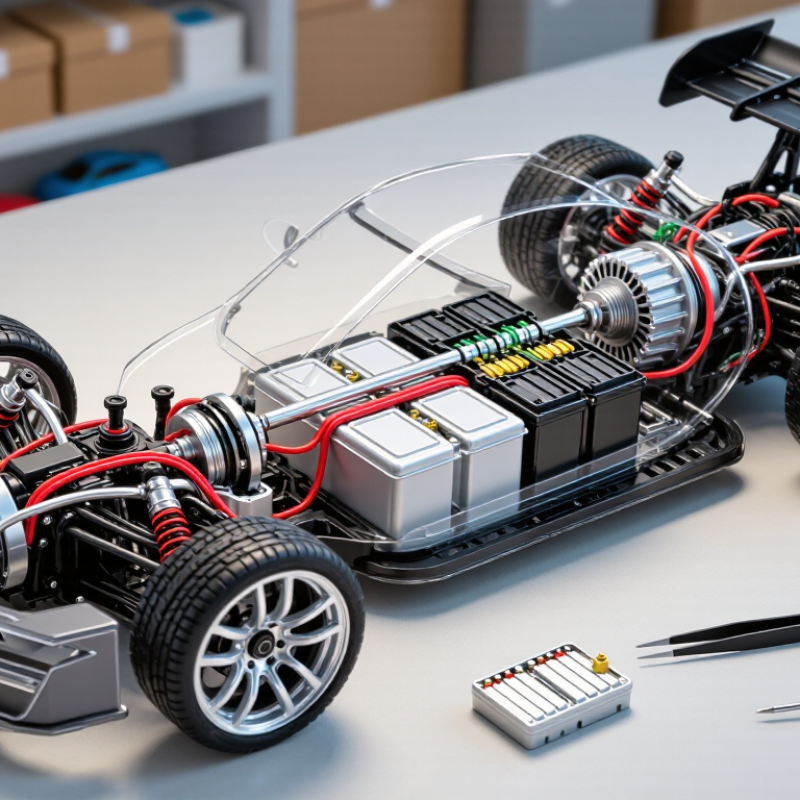
A remote control car that will not move may have a battery problem, a loose connection, or a drive-system fault.
Identify its power setup before replacing parts. Many cars use rechargeable battery packs; others use replaceable cells in the car and controller. Check the labels and battery compartments.
A dim controller light can suggest weak batteries, while a car that lights up but stays still may have a different fault.
Note what happens when you steer or press the throttle. Silence matters. Clicking, brief wheel movement, or a motor hum each points to a different symptom, though none proves the cause by itself.
Tips:
Switch the car off before checking its battery. Look for corrosion, bent contacts, loose plugs, or a pack that feels unusually warm. Do not open a swollen or damaged battery. If you use a charger, confirm that it is intended for that battery type and follow its instructions.
Test the controller with fresh cells, then check the car’s power source separately. If the controller light fades when you accelerate, the car’s battery may be weak or poorly connected.
If lights stay steady but the wheels do not turn, inspect the drive wheels for tangled hair or grit.
I once overlooked a tiny thread around an axle; it was easy to miss.
Still, repeated stalling can indicate worn gears or a damaged motor, and further testing may be needed.
A remote control car that will not move may have a simple power problem. Start with the car’s batteries, not the motor. Check that each cell sits firmly in its holder and that the positive and negative ends match the markings. Even new batteries can be weak if they have been stored for a long time. Try a fresh, matching set, and avoid mixing old and new cells. A small voltage difference can cause lights to work while the car stays still.
Check the controller, too. Make sure its power switch is on and its batteries are installed correctly. Then switch off the car and remove its batteries before inspecting the compartment. Look for loose wires, bent contacts, or white and green residue near the terminals. Corrosion can interrupt power; do not scrape contacts while batteries are installed. If a wire looks detached, avoid pulling it or bridging connections with metal. That can damage the circuit. Reseat the battery pack and close the compartment firmly, since a loose cover may let cells shift during use. Test the car on a clear, flat surface. I once blamed a stuck wheel, but the real issue was a weak battery contact—an easy mistake to make.
When a remote-control car will not move, inspect the handheld controller first. Do not trust a bright indicator light alone. Two weak batteries can still power the light but fail under signal load. Install matching, fresh batteries with the correct polarity. Check for white or green residue on the metal contacts. Clean light residue with a dry cotton swab, then let the compartment dry completely. A loose battery spring can interrupt power when you squeeze the trigger.
Pairing problems are common after battery replacement or storage. Turn off both units, wait ten seconds, and place the car on a stable surface. Follow the pairing sequence stated in its manual. Usually, the controller and car must power on within a short interval. Watch for a flashing light that becomes steady. If nothing changes, remove nearby wireless devices and try again. I once blamed the motor, but the controller had simply lost its connection.
Test the control signals with the wheels lifted safely off the floor. Squeeze the throttle slowly and listen for a faint motor response. Turn the steering control and check whether the front wheels react. If steering works but driving does not, inspect the throttle trigger, trim setting, and receiver connector. Move the controller antenna area away from metal objects. Intermittent response deserves attention; repeated button presses can hide a weak signal. A careful test log helps, although I sometimes skip it and regret the guesswork later.
When a remote control car powers on but will not move, inspect the wheels before opening the body. Switch it off and disconnect the battery. Turn each wheel by hand; they should rotate without scraping or catching. A strand of hair, carpet fiber, or grit can wrap around an axle and stop movement. Check both sides, including the narrow gap behind each wheel. A small obstruction matters.
Next, look at the motor pinion and gears. Use a flashlight to spot dirt, cracked teeth, or gears that have slipped out of alignment. Clear debris gently with a soft brush, not a sharp tool. It is easy to blame the motor too soon. Check that the wires remain connected and the motor shaft can turn freely. Then inspect the drivetrain, including drive shafts and joints, for a jam or loose connection. If a wheel spins freely while another stays still, the fault may be in a gear or axle rather than the motor. Avoid forcing stuck parts; plastic teeth can break, and I have seen a small jam become a larger repair.
Start with the wheels and drivetrain because visible blockages are quick to identify. If the wheels turn freely, inspect the motor, gear mesh, and drive shafts for stripped teeth, jammed debris, loose connections, or mechanical binding. The chart compares typical inspection and repair time for each area.
A remote control car that will not move needs a safe, methodical check. Remove the battery before opening the chassis. Keep hands clear of wheels and gears during powered tests. Inspect the controller batteries, switch position, and visible corrosion on the car’s contacts. Clean dull contacts with a dry cotton swab. Do not scrape aggressively; thin metal can bend or break.
Test the car on a stand, with its wheels off the floor. Reconnect the battery, then press the throttle briefly. Listen for a motor hum, clicking gear, or complete silence. A hum often suggests a jammed drivetrain or worn gear. Silence may point to a loose wire, damaged switch, or failed motor. Check each connector gently. I once blamed the motor, but a nearly broken wire caused the fault. My first diagnosis was too quick.
Look for melted plastic, burnt smells, cracked gears, or teeth that no longer meet. Replace a gear when teeth slip under light resistance. Replace a motor when its shaft feels rough or fails after secure wiring. A swollen, leaking, or unusually hot battery should not be reused. Stop testing it and use an approved recycling route. If cleaning and tightening restore movement, monitor the car during short runs. A repair can work briefly and still hide deeper wear. Document what changed, because memory becomes unreliable after several tests.
Weak or poorly seated batteries can power the lights but not the motor. Try a fresh, matching set. Check the positive and negative markings.
Confirm its switch is on and its batteries are installed correctly. Simple, but easy to miss.
Switch off the car and remove its batteries first. Look for loose wires, bent contacts, or pale green and white residue. Clean dull contacts gently with a dry cotton swab.
It may indicate a loose wire, damaged switch, or failed motor. Check connectors gently before replacing parts.
A hum can point to a jammed drivetrain or worn gear. Clicking may suggest slipping teeth. Inspect the gears for cracks and poor contact.
Place it on a stand with the wheels off the floor. Keep hands clear, reconnect the battery, and press the throttle briefly.
Replace gears when their teeth slip under light resistance. Consider replacing a motor if its shaft feels rough or it fails despite secure wiring.
Stop testing it and do not reuse it. Use an approved recycling route.
Record each change and test result. Memory gets fuzzy after repeated checks, and one repair may hide deeper wear.
When a remote control car suddenly stops moving, begin by identifying its power system and observing the symptoms. Check whether the car shows lights, sound, or steering response, as these clues can reveal whether the issue involves power, signals, or the drive system. Inspect the car’s batteries for low charge, correct placement, corrosion, or damage. Then examine the power switch, battery contacts, wires, and connectors for looseness or dirt. A simple cleaning or secure connection may restore operation.
Next, test the remote with fresh batteries and confirm that it is properly paired with the car. Make sure the controls produce a response before examining the wheels, motor, gears, and drivetrain for hair, dust, stones, or jammed parts. If you are searching for how to fix a remote control toy car that won't move, test each repair carefully on a clear surface with the wheels raised first. Replace damaged batteries, motors, gears, or wiring when cleaning and reconnecting do not solve the problem.

Hoopla Toys